
 USA
USA
 Canada
 Australia


Introduction
Shopify sales rarely equal the amount deposited into your bank account. Discounts, refunds, processing fees, taxes, adjustments, and payout timing can all change the final amount. To reconcile Shopify payouts, you need to connect Shopify sales and payout details with your accounting records and bank deposits. Whether you use QuickBooks Online or Xero, NCSGX can help Canadian businesses keep their bookkeeping organized and make payout differences easier to identify and resolve.
Key Takeaways
- Shopify payouts represent cash transferred to the bank, not necessarily gross Shopify sales.
- A Shopify Payments clearing account can separate transaction activity from actual cash movement.
- QuickBooks Online and Xero support Shopify workflows, but their integration processes are not identical.
- GST/HST should be reconciled to the underlying sales and tax records, not simply to the bank deposit.
- A mismatch should be investigated rather than corrected with an unexplained adjustment.
How to Reconcile Shopify Payouts in QuickBooks Online or Xero
If your Shopify bank deposit never seems to match your sales total, you are not alone. A Shopify payout is the net amount sent to your bank after fees, refunds, adjustments, and timing differences. To keep your books accurate, you need to reconcile Shopify payouts by recording gross sales, fees, taxes, and the actual deposit. This guide shows you how to do that in QuickBooks Online and Xero, with Canadian GST/HST considerations.
Why Shopify Payouts Do Not Match Your Sales
Your Shopify sales report shows gross order value, taxes, discounts, and sometimes orders that have not yet been paid out. Your bank deposit shows the net amount Shopify actually sent you.
Common reasons a Shopify payout not matching bank deposit occurs include:
- Gross sales vs net payout : Payouts deduct processing fees before funds leave Shopify.
- Discounts and promotions : These lower the amount collected but do not always appear as a separate line in your bank feed
- Adjustments and reserves : Shopify may hold funds for risk, disputes, or capital remittances.
- Timing differences : Settlement can take several days, and weekend payouts are consolidated.
- Taxes : GST/HST collected on sales is part of the gross amount but is a liability, not income.
The result is that your bank deposit will rarely equal your total Shopify sales for the same period. Shopify’s payout reconciliation report can help you review transactions, fees, and payouts to understand the difference. Reconciliation is about explaining the difference, not forcing the numbers to match.

What You Need Before Reconciling a Shopify Payout
Gather these records before you start:
- Bank statement showing the actual deposit from Shopify.
- Refund and chargeback details from Shopify.
- Processing fee breakdown from Shopify.
- Tax summaries for GST/HST and any provincial taxes.
- Reports from other payment providers if you use them (for example, PayPal).
Compare the Shopify payout detail to the actual bank deposit. If the amounts differ, trace the difference to fees, refunds, adjustments, or timing.
How a Shopify Payments Clearing Account Works
A Shopify Payments clearing account is a practical bookkeeping approach for separating Shopify transaction activity from the cash that eventually reaches the bank.
Instead of posting every Shopify transaction directly to the bank, sales, refunds, fees, and other applicable activity can flow through a clearing account. The net payout is then transferred from the clearing account to the bank account.
The clearing account should be reviewed regularly. A remaining balance may represent pending transactions, timing differences, refunds, adjustments, or an entry that has not been recorded correctly. The objective is not to force the account to zero, but to understand what each balance represents. For businesses managing transactions remotely, virtual bookkeeping can also help keep Shopify activity, bank feeds, and accounting records connected in one workflow.
How to Reconcile Shopify Payouts in QuickBooks Online
The Shopify payouts QuickBooks Online workflow should be based on the underlying Shopify transaction detail rather than simply matching the bank deposit.
- Review the Shopify payout report : Confirm the payout date, currency, transactions, fees, refunds, and adjustments.
- Record or import the activity : QuickBooks Online supports Shopify connections that can bring Shopify transactions and related details into the accounting system.
- Separate the components : Make sure sales, refunds, fees, taxes, and other applicable items are mapped to the correct accounts.
- Use the clearing account where appropriate : Post the net Shopify payout as the movement from the clearing account to the bank.
- Match the bank deposit : Compare the net payout with the actual bank transaction.
- Investigate differences : Do not create an arbitrary adjustment just to make the bank reconciliation balance.
- Review the clearing balance : Unexplained balances should be traced back to Shopify activity.
For businesses using Shopify payouts QuickBooks Online, consistent account mapping and regular reconciliation can make month-end review much easier.
How to Reconcile Shopify Payouts in Xero
The Shopify payouts Xero process follows the same accounting principle, but the integration workflow is different.
- Review Shopify payout details for sales, refunds, fees, taxes, and adjustments.
- Check which Shopify transactions have been imported into Xero.
- Review the Shopify integration’s account and tax mapping.
- Use the appropriate clearing or Shopify payment balance account.
- Match the net payout transfer with the bank deposit.
- Investigate unmatched amounts instead of forcing a reconciliation.
- Reconcile the clearing account and bank account separately.
Xero’s Shopify integration can sync daily sales and fees to a Shopify Payment Balance account and create a transfer when Shopify sends the deposit to the bank. This makes the Shopify payouts Xero workflow easier to review when the integration is configured correctly.
Canadian GST/HST and Provincial Tax Checks
GST/HST should be tied to the underlying taxable sales and supporting records, not simply to the amount deposited by Shopify. A net payout may already reflect fees, refunds, and other deductions.
During Shopify GST/HST reconciliation, compare the tax amounts in Shopify with the tax amounts recorded in your accounting system. Also review how applicable provincial taxes are being handled based on your business and transactions. A proper Shopify GST HST reconciliation therefore connects Shopify reports, accounting entries, invoices, receipts, and tax records rather than relying only on bank deposits.
How to Handle CAD and USD Shopify Payouts
Currency can create another reconciliation difference. Shopify Payments in Canada supports CAD payouts and, for eligible stores that meet the applicable plan and account requirements, may support USD payouts through multi-currency payouts.
For each currency:
- Use the appropriate CAD or USD bank account where applicable.
- Confirm the currency of the Shopify payout.
- Review the exchange rate used in the accounting records.
- Reconcile each currency separately.
How to Fix a Shopify Payout That Will Not Reconcile
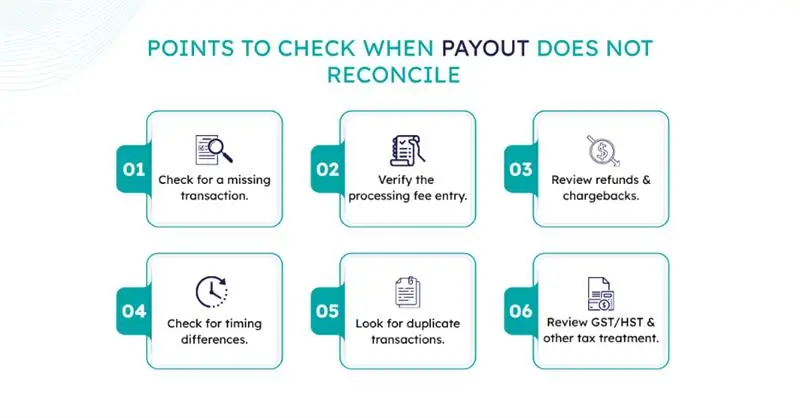
When you have a Shopify payout not matching bank deposit, work through the difference systematically:
Monthly Shopify Payout Reconciliation Checklist
Use this quick monthly review:
- Download or review Shopify payout reports.
- Compare each payout with the bank deposit.
- Reconcile the Shopify Payments clearing account.
- Review refunds and chargebacks.
- Check GST/HST and applicable provincial taxes.
- Investigate unmatched payouts.
- Review CAD and USD transactions separately.
- Save GST/HST records and supporting documents along with Shopify and accounting records.
When the Reconciliation Process Needs Professional Review
Consider a bookkeeping or accounting review when the clearing account does not reconcile, payout differences happen frequently, or large amounts remain unexplained. Professional review can also help when you have multiple currencies, several payment providers, complex refunds or chargebacks, GST/HST discrepancies, or high transaction volume.
Accurate bookkeeping can help keep Shopify activity, bank reconciliations, and supporting records organized.
Conclusion
Reconciling Shopify payouts is about understanding why your sales and bank deposits differ and tracing every fee, refund, tax, adjustment, and payout correctly. A consistent reconciliation process helps keep your QuickBooks Online or Xero records, clearing accounts, and GST/HST information accurate. If payout differences continue or your records are becoming difficult to manage, Contact us to discuss the right next steps for cleaner, more reliable books.
How NCSGX Can Help
NCSGX can help organize Shopify transactions, reconcile payouts against bank deposits, investigate unexplained differences, and keep clearing accounts properly reviewed. The process can also include GST/HST record organization and month-end bookkeeping, so your books remain ready for reporting and tax work. For related bookkeeping guidance, see NCSGX’s bookkeeping software guide.
Frequently Asked Questions (FAQ)
1. Should I record a Shopify payout as sales income?
No. A Shopify payout is the net amount deposited into your bank, while sales, fees, refunds, and taxes should be recorded separately.
2. Why does my Shopify payout not match my sales report?
Because the payout is reduced or affected by fees, refunds, adjustments, taxes, and transactions that have not yet been paid out.
3. Do Shopify Payments reports include PayPal sales?
No, not automatically. Shopify Payments and PayPal are separate payment flows and should be reconciled based on their respective transaction records.
4. Should a Shopify Clearing Account always have a zero balance?
Not always. Temporary balances can result from pending payouts, timing differences, refunds, or adjustments, but unexplained balances should be investigated.
5. How should Shopify refunds be recorded?
Record the refund against the appropriate sales or revenue and related tax amounts, then match it with the Shopify refund and payout records.
6. Are Shopify fees subject to GST/HST in Canada?
It depends on the specific Shopify charge. Check out the tax shown on the relevant Shopify invoice or record before determining the GST/HST treatment.